UGC SCRIPTS FOR APPS
Turn a TikTok reference into a script for your app.
AngleCue reads the public words it can retrieve, then AI sketches a reviewable voiceover and filming directions around the product words you confirm.
Limited free experiment · no questionnaire or upload · purchases closed
WHAT THE OUTPUT LOOKS LIKE
App UGC script example: words and a screenshot shot.
- Say
- AngleCue reviews available public TikTok descriptions and published subtitles. AI explains quoted source passages when its step completes. It does not review video or audio. The initial reference review starts with a TikTok link and needs no questionnaire or upload.
- Film
- Show your supplied result screenshot as it is.
- Creator note
- Gesture toward the screen with an open hand, maintaining a professional but approachable demeanor while the material is displayed.
These product sentences are preserved from the full internal brief. AI proposed its opening and filming directions; it did not inspect the image pixels or observe an app demonstration. Review the words and material before filming.
See the complete script and filming steps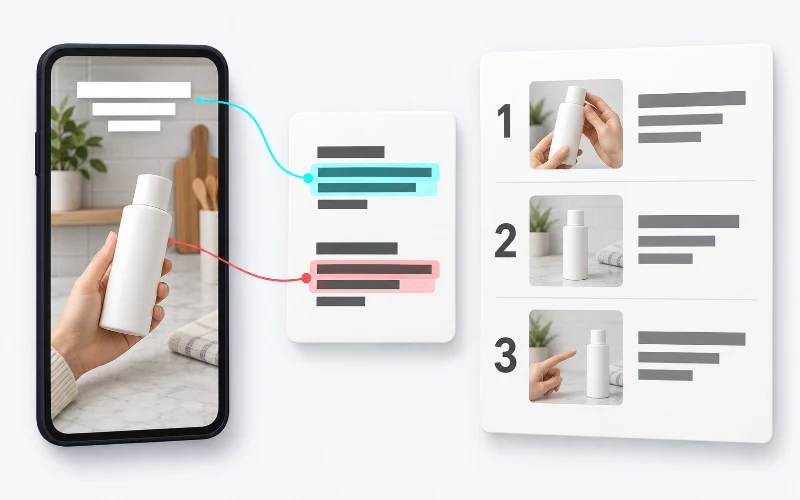
Start with the reference
AngleCue collects the available public description and published subtitles from a supported TikTok link. AI connects those source words into a short explanation; the quotes stay beside it. It does not review video footage or audio, extract on-screen text, collect comments, or verify the creator’s claims.
One check before the script
Choose Prepare your product video, add a supported public product-page link, check the complete returned statement and captured still, and confirm once. AI then sketches the opening and physical filming directions. Choose Keep this task to save it with Google.
Limits to know before you start
Page coverage is incomplete, and AI does not inspect image pixels. Use only an image you can use and review the proposed shoot before filming.
One public scan per day. No questionnaire or upload is required. Tasks expire within 24 hours of the original reference capture; saving does not extend that expiry. Some pages and links are unsupported, and generation may fail. Purchases remain closed.